Introduction
Welcome to our web design cost calculator. This calculator is easy to use and helps you estimate the cost of your website design based on your needs and budget. Follow the steps below to get an accurate estimate:
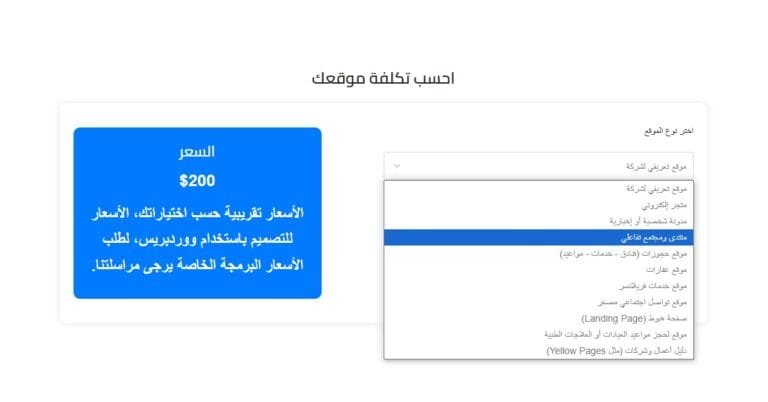
Step 1: Determine the type of site
- Explanation: In this step, you need to decide what type of website you want to design. There are different types of websites, and each type has a different cost.
- Types of sites:
- Induction site: To display information about your company or services.
- Online store: to sell products online.
- Blog: to publish articles and share information.
- Personal site: To display information about you or your business.
- Other types: (List other types if you have them in your calculator).
- Photo illustration:
Step 2: Determine the number of pages
- Explanation: Determine how many pages you need on your site. The more pages, the more expensive the design will be.
- The relevance of the pages:
- Home page: to display a summary of your site.
- Contact Us page: To facilitate communication with customers.
- Services pages: to showcase your services in detail.
- Product pages: to showcase your products for sale.
- Other pages: (Include other pages if they are necessary for your site).
- Photo illustration:

Step 3: Choose Additional Features
- Explanation: Decide what additional features you want on your site. These features may increase the cost of the design, but they add a lot of value to your site.
- Additional features:
- Responsive design: It makes your site compatible with all devices, such as smartphones and tablets.
- SEO optimizations: It helps improve your site's visibility in search results.
- Technical support: It provides you with help if you run into any issues.
- Other features: (Mention other features if they are present in your calculator).
- Photo illustration:

Step 4: Getting Recognized
- Explanation: After selecting all the options, click the "Calculate" button to get an estimate of the cost of your site design.
- How to use the calculator:
- Select a location type from the drop-down menu.
- Enter the number of pages required.
- Choose the additional features you want.
- Click the "Calculate" button.
- Important notes:
- This estimate is a rough estimate of the cost.
- Actual cost may vary based on project details.
- You can contact us to discuss the details of your project and get an accurate quote.
- Photo illustration:

Conclusion
We hope this page has helped you understand how to use our web design cost calculator. If you have any other questions, feel free to reach out to us.